


LinkedIn Sales Navigator
4.3302.00 Reviews
App Specs
- Version
- 6.29.60
- Updated On
- License
- Free
- Downloads
- 1,000,000+
- Developer
- Categories
- Business
- Platform
- Android, iOS
Screenshots
 Analysis by AppCompare
Have you ever found yourself scrolling through LinkedIn, trying to keep up with all those connections, leads, and potential clients? Yeah, I’ve been there too. But then I stumbled upon LinkedIn Sales Navigator, and let me tell you, it’s like finding a secret weapon in the epic battle of sales and networking. Let’s dive into what makes this app a must-have for anyone trying to up their game in the world of professional networking.
First Impressions and Getting Started
So, right off the bat, LinkedIn Sales Navigator looks pretty sleek. It’s got that familiar LinkedIn vibe, which is comforting, but it’s also packed with a bunch of features that make you feel like you’re on a whole new platform. Setting it up is a breeze—you just sync it with your existing LinkedIn account and voilà, you’re good to go.
Once you’re in, you’ll notice it’s not just about connecting with people you already know. This app is all about finding new leads and opportunities that you might not have even considered. And trust me, it does a darn good job at it.
Who gets the most from a focused prospecting app
I see the strongest fit for people whose work depends on finding and following up with business contacts: sales representatives, founders doing their own outreach, recruiters building a targeted pipeline, or consultants looking for organizations that match a clear brief. The useful distinction is not simply “professional” versus “casual” use. It is whether you have a repeatable reason to search for people and companies, then return to those prospects over time.
If you only need to look up a colleague, keep up with familiar contacts, or browse occasional industry posts, the regular LinkedIn experience is likely the simpler choice. A dedicated prospecting workflow adds value when broad browsing turns into a time sink. If you cannot describe whom you want to reach and why, more filters may not solve the underlying problem; they can just make an unfocused search feel more sophisticated.
Diving into the Features
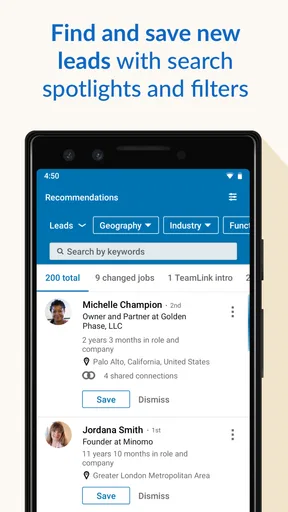
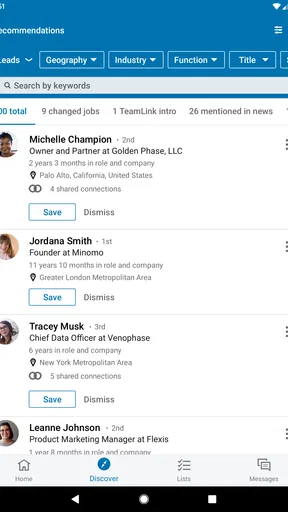
The real magic of LinkedIn Sales Navigator is in its features. One of the coolest things is the advanced search. If you’ve ever felt limited by LinkedIn’s standard search, this is where you’ll be doing a happy dance. You can filter by company size, industry, geography, and more—basically, you can zero in on exactly the kind of leads you’re looking for.
My practical advice is to start with a narrow description of a good prospect, not every filter you can think of. For example, define the kind of organization you serve and the part of the business likely to care about your offer, then refine the results in stages. That makes it easier to notice which criterion is excluding promising people. A very tight search can feel precise while quietly missing adjacent roles or organizations that use different wording for the same work.
Worth Reading Before You Choose

EA SPORTS FC Mobile 26 Is a Bigger Football Game, but It Takes Time

Flipboard Shows What News Apps Must Do Beyond the Feed

Switching to Android Auto Means Rethinking Your Driving Routine

Google Calendar Makes a Crowded Week Easier to Manage

Ludo King Makes the Most of the Minutes Between Plans

Baby Panda World Brings Quick Play to Modern Phones, but Its Game Library Feels Busy
Then there’s the Lead Recommendations feature. It’s like having a personal assistant who knows exactly what you need. Based on your preferences and past searches, it suggests people and companies that might be worth your time. It’s like the app knows you better than you know yourself.
I would treat those suggestions as prompts to investigate, rather than a ready-made call list. A recommendation can put a relevant profile in front of you, but you still need to check whether the person’s role and company make sense for your particular approach. One useful habit is to note what makes a suggested lead relevant before saving it. Over time, that simple discipline helps separate genuinely useful discovery from collecting names because they happened to appear on screen.
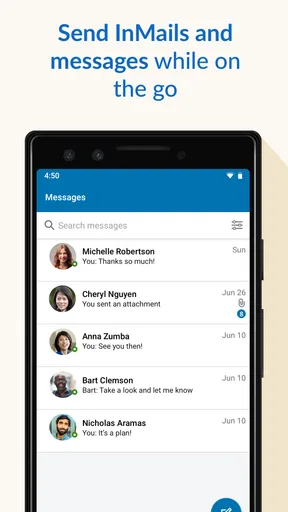
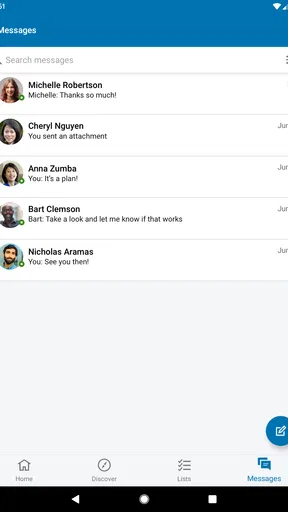
The InMail feature is another biggie. If you’ve ever felt the frustration of your messages getting lost in the LinkedIn abyss, InMail gives you a better chance of reaching out to people who aren’t in your immediate network. You get a certain number of credits each month, and you can send messages directly to the inboxes of potential leads. It’s like cutting through the noise with a VIP pass.
That direct route is most valuable when you have a specific reason for contacting someone outside your existing connections. I would not use it as a substitute for a thoughtful message: a short note that shows why this person, why this organization, and why now is more considerate than a generic pitch. Treat the monthly credits as a limited resource and prioritize people you have researched, rather than spending them on every plausible search result. If your work relies mostly on warm introductions or existing relationships, those channels may still feel more natural.
Staying Organized
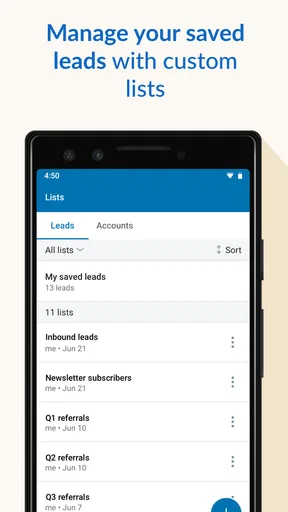
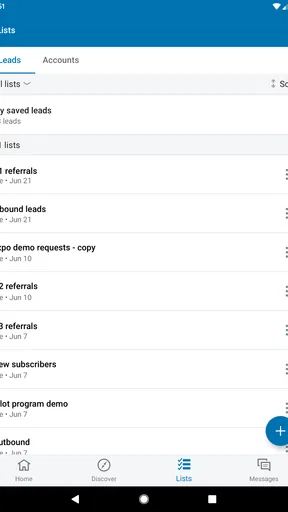
Now, I’m not the most organized person in the world, but the app’s ability to save and organize leads is a lifesaver. You can save profiles directly into your Sales Navigator account and organize them into custom lists. This way, you’ll always know where to find that promising lead you came across last week.
Lists become much more useful when each one reflects a real next step, not just a broad topic. I might keep separate groups for prospects I need to research, people I am ready to contact, and contacts whose timing I want to revisit. That small distinction makes a saved profile easier to act on later. Otherwise, lists can turn into another inbox: full of names, but unclear about what I should do next.
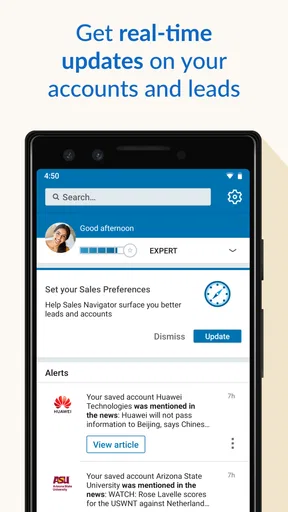
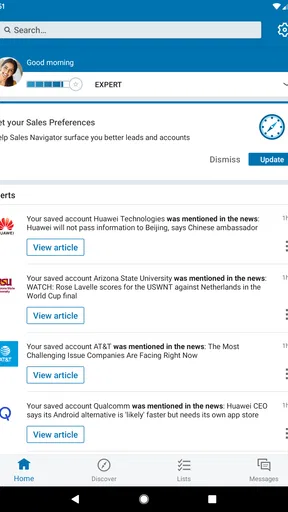
Another feature that’s pretty sweet is the ability to get real-time updates on your saved leads and accounts. You can catch important updates and engage with content that matters to them. It’s like being in the loop without having to spend hours scrolling.
Updates are most helpful as context for a relevant follow-up, not as a reason to message someone every time something changes. I would scan them with a question in mind: does this give me a genuine reason to congratulate, ask, or share something useful? If not, there is no need to force an interaction. This keeps monitoring from becoming a second full-time feed and helps make outreach feel attentive rather than automated.
A realistic day with the app
Imagine I have a short gap before a meeting and want to prepare for a conversation with a company I have not worked with before. I can use that time to check relevant people, save the profiles that fit, and make a note of who appears worth learning more about. Later, when I have a proper block of time, I can review that small group, look at available updates, and decide whether an InMail or another route makes sense. The benefit is not that every lead instantly becomes a customer; it is that the research and follow-up are less likely to disappear into an endless general feed.
This is also where the mobile version earns its place. A quick check between appointments can help me capture a useful lead while I remember why it caught my attention. I would still leave careful research and message drafting for a moment when I can concentrate. A phone is convenient for keeping momentum, but rushing an important first message on a tiny screen is an avoidable trade-off.
The Mobile Experience
Let’s face it, we’re all glued to our phones. And the good news is, LinkedIn Sales Navigator has a mobile app that’s just as powerful as the desktop version. Whether you’re on a coffee break or waiting for a meeting to start, you can easily browse leads, send InMails, and stay updated on your prospects.
The interface is clean and intuitive, and navigating through different features feels like second nature. It’s all about making the most of those little pockets of time throughout the day.
For me, that convenience works best when mobile is used to capture, check, and continue a workflow rather than replace every part of it. If I am comparing several prospects or trying to write a careful message, I prefer a larger screen and fewer distractions. On the other hand, seeing a timely update while I am away from my desk can help me remember to follow up when it is still relevant. The app’s strongest mobile contribution is continuity: it keeps prospecting within reach without making every spare minute feel like another work session.
How it compares with ordinary LinkedIn and other approaches
Compared with ordinary LinkedIn browsing, the main difference is the emphasis on targeted discovery, saved prospects, and ongoing attention to selected accounts. The general network is better when I want to maintain relationships, explore content, or make a casual search. Sales Navigator makes more sense when I have a defined audience and want a deliberate process for finding and revisiting people.
It is also not a replacement for a team’s broader customer-management process or for the conversations themselves. A dedicated prospecting tool can help organize the front end of outreach, but it cannot decide whether a lead is a good fit, build trust, or keep a team’s wider work coordinated. If your needs are mostly about recording customer conversations and managing a shared pipeline, a CRM may be the more appropriate center of your workflow. If your needs are about identifying relevant people on LinkedIn, this app is more directly focused.
For a small business owner who is doing occasional outreach, the free entry point may make it easy to explore the app, but the paid features deserve a clear purpose before becoming part of a routine. Someone who prospects regularly may value the time saved by narrowing searches and keeping leads organized. Someone who rarely contacts new people may get more from using the standard network carefully and keeping a simple list elsewhere.
Friction removed—and friction that remains
The biggest friction it removes is the repeated hunt: searching broadly, losing a promising profile, then starting over when it is time to follow up. Search, saved lists, and updates can give that work a more consistent shape. They do not eliminate the judgment involved. I still need to check whether a person is relevant, whether a message is appropriate, and whether I have a useful reason to reach out.
There is also a learning curve in deciding how to structure searches and lists. If I save too many profiles, organization becomes noise; if I make every search too restrictive, I may overlook useful prospects. The best balance is to review the results, adjust one part of the search at a time, and save only people I can explain the relevance of. That is a more dependable habit than assuming a tool’s recommendations will do the qualification for me.
LinkedIn Sales Navigator is a free business app from LinkedIn, with an Everyone age rating. It was released on May 30, 2015, and version 6.29.56 supports Android 8.0 and newer. It has a 4.3 average from around 10,000 ratings, with about 301 written reviews and over one million installs. Those figures suggest a well-established audience, but they do not tell me whether it fits an individual workflow; the real test is whether its prospecting tools solve a recurring problem for you.
Is It Worth It?
Alright, so let’s talk about the elephant in the room—cost. Is LinkedIn Sales Navigator worth the subscription fee? If you’re serious about sales and networking, I’d say absolutely. It’s an investment in your professional growth. The app gives you tools to find leads more efficiently, engage with them better, and ultimately close more deals.
I would make that decision based on repeated use, not on the promise of finding more contacts. The app is free to install, while in-app purchases range from $79.99 to $119.99 per item. Before paying, I would ask whether I will use targeted search, lead organization, updates, or InMail often enough to justify the expense for my own work. A person with an active prospecting routine has a clearer case than someone who only wants occasional access to professional profiles.
In a world where connections are everything, having a tool that helps you make the right ones is invaluable. Plus, with the ability to track and organize your prospects, you’re setting yourself up for long-term success.
So, if you’re all about leveling up your networking game, give LinkedIn Sales Navigator a go. It’s like having a personal sales assistant right in your pocket, ready to help you conquer the world of professional networking.
My recommendation is strongest for people who can name a target audience, make time to review prospects, and follow up with care. If that describes your working week, the app can reduce wasted searching and make a mobile moment useful. If you want a general social network, rarely contact new prospects, or expect recommendations to do the selling for you, I would stick with ordinary LinkedIn or another tool that better matches your daily work. Used with a clear process, this one can make prospecting feel more manageable; without one, it can simply give you another place to collect names.
Pros
- Advanced lead recommendations enhance targeting.
- Integrates seamlessly with CRM systems.
- Real-time updates on leads and accounts.
- In-depth insights into potential clients.
- Mobile app extends functionality on the go.
Cons
- Subscription is relatively expensive.
- Complex interface for new users.
- Limited functionality in free version.
- Occasional inaccuracies in data.
- Requires constant internet connection.
FAQs for LinkedIn Sales Navigator
What is LinkedIn Sales Navigator and how does it benefit sales professionals?
LinkedIn Sales Navigator is a premium tool designed to help sales professionals find and build relationships with potential clients. It offers advanced search capabilities, lead recommendations, and real-time insights to streamline the sales process. By leveraging LinkedIn’s vast network, users can efficiently connect with decision-makers and track their interactions, ultimately enhancing sales productivity and effectiveness.
How does LinkedIn Sales Navigator integrate with CRM systems?
LinkedIn Sales Navigator integrates seamlessly with popular CRM systems like Salesforce and Microsoft Dynamics 365. This integration allows users to sync lead and contact information directly into their CRM, ensuring data consistency and reducing manual data entry. The integration also provides insights and updates from LinkedIn directly within the CRM, enhancing sales strategies and client engagement.
Is there a mobile app for LinkedIn Sales Navigator, and what features does it offer?
Yes, LinkedIn Sales Navigator offers a mobile app available for both Android and iOS. The app allows users to access their leads and insights on the go. Key features include lead recommendations, real-time notifications, and the ability to send InMail messages. The mobile app ensures that sales professionals can stay connected and responsive, even when away from their desks.
What are the pricing options for LinkedIn Sales Navigator?
LinkedIn Sales Navigator offers several pricing plans to suit different needs. There are Professional, Team, and Enterprise plans, each with varying levels of features and user capabilities. The Professional plan is ideal for individual users, while the Team and Enterprise plans offer advanced features for collaboration and integration. Pricing details can be found on LinkedIn’s official website, and they often offer a free trial period to test the service.
Can LinkedIn Sales Navigator be used for industries outside of traditional sales roles?
Absolutely, LinkedIn Sales Navigator can be beneficial for a variety of industries beyond traditional sales roles. Professionals in recruitment, business development, and marketing can leverage its advanced search and networking capabilities to identify potential candidates, partners, or clients. The tool's versatility makes it valuable for any role that requires relationship building and strategic outreach.


